
Overview
Data retention deletes what is older than a period you choose. Each kind of data has its own period, and each is off until you set it, so nothing is deleted on an upgrade. Every day at 05:00 UTC, Notifuse deletes or anonymizes what has passed its period.
A change that deletes more waits 7 days before it takes effect, and the workspace owners get an email. You can cancel it until then.
Data retention is a licensed capability (Enterprise). See Licence below.
Where to set it
Owners set the policy in Settings → Data retention. The page lists each kind of data with its period, the shortest period it accepts, and a suggested period that follows the CNIL’s guidance.
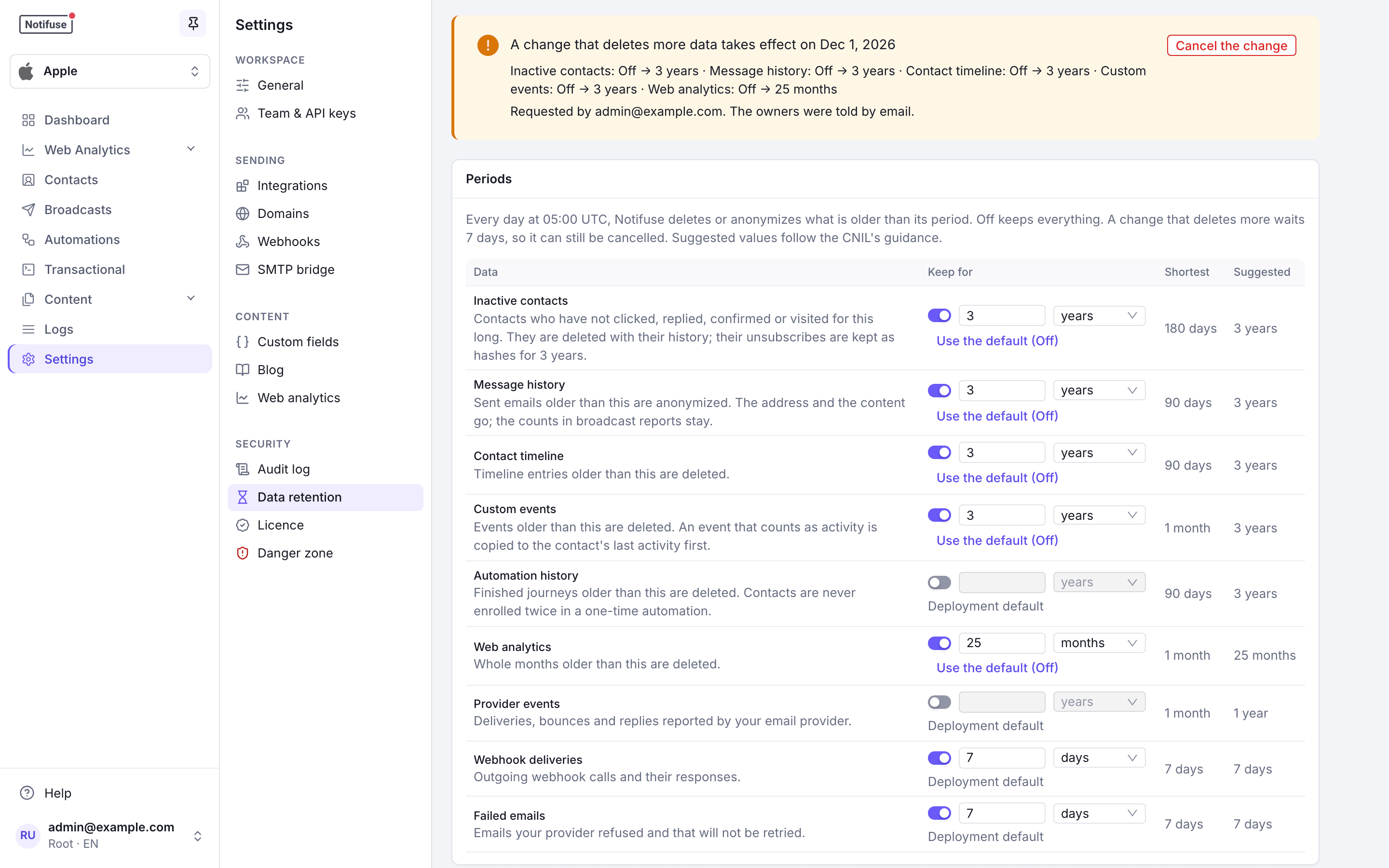
Preview and save shows what the first run will remove before anything is saved: how many contacts, messages, events and rows, and which segments will change because their conditions read data that will be gone.
The root user can also set defaults for every workspace in System Settings → Data retention. A workspace that sets its own period keeps it. A default that deletes more waits 7 days too, and the owners of every workspace it reaches get the email.
What each period removes
| Data | What happens | Shortest | Suggested |
|---|---|---|---|
| Inactive contacts | Contacts with no activity for this long are deleted, with their history. See Inactive contacts. | 180 days | 3 years |
| Message history | Sent emails are anonymized: the address and the content go, and the counts in broadcast reports stay. | 90 days | 3 years |
| Contact timeline | Timeline entries are deleted. | 90 days | 3 years |
| Custom events | Events are deleted. An event that counts as activity is first copied to the contact’s last activity. | 30 days | 3 years |
| Automation history | Finished journeys are deleted. A contact is still never enrolled twice in a one-time automation. | 90 days | 3 years |
| Web analytics | Whole months of sessions, pageviews and goals are deleted. | 30 days | 25 months |
| Provider events | Deliveries, bounces and replies reported by your email provider are deleted. | 30 days | 1 year |
| Webhook deliveries | Outgoing webhook calls and their responses are deleted. | 7 days | 7 days |
| Failed emails | Emails your provider refused and that will not be retried are deleted. | 7 days | 7 days |
Webhook deliveries and failed emails were already deleted after 7 days before data retention existed, and they still are by default. You can switch them off or keep them longer. Periods go up to 10 years.
Inactive contacts
A contact’s inactivity is counted from the most recent of:
- the date it was created;
- its last click, reply, double opt-in confirmation, subscription it made itself, or identified visit to your website;
- its last custom event among the names you chose in Custom events that count as activity, such as a purchase or a login.
An open never counts: mail clients and privacy features open emails on their own, so an open says nothing about the person.
Members of the lists in Never delete members of these lists and the segments in Never delete members of these segments are never deleted, whatever their status in the list. If one of these lists is deleted or one of these segments is being rebuilt, no contact is deleted as inactive until it is back. A segment that uses the expiring-soon condition cannot be exempt.
A contact deleted as inactive is erased the same way as with contacts.delete. The lists it unsubscribed from, bounced on or complained about are kept for 3 years as a keyed hash, so the address is not mailed again if it comes back. The contact.deleted webhook carries the address only, and no segment.left webhook is sent.
Past activity
When you upgrade to 45.0, Notifuse reads each workspace’s past clicks, replies, confirmations and visits from its history, so that a contact who clicked last month is not counted as inactive since its creation date. Until this has finished, no contact is deleted as inactive. The page says when it has finished. If it fails, Run it again starts it again.
Changes that delete more wait 7 days
Switching a category on, shortening a period, removing an exemption or removing an event name that counts as activity deletes more. Such a change is saved but waits 7 days, and every owner of the workspace gets an email with the date. Until then, the runs keep the policy in force, and Cancel the change on the page drops it.
Everything else applies at once: switching a category off, keeping data longer, adding an exemption.
Before contacts are deleted
The segment condition Data retention matches the contacts that will be deleted as inactive within a number of days you choose, from 1 to 365. Use it with an automation that starts on segment.joined to ask those contacts whether they want to stay. A click on that email is activity, so the contact leaves the segment and is kept.
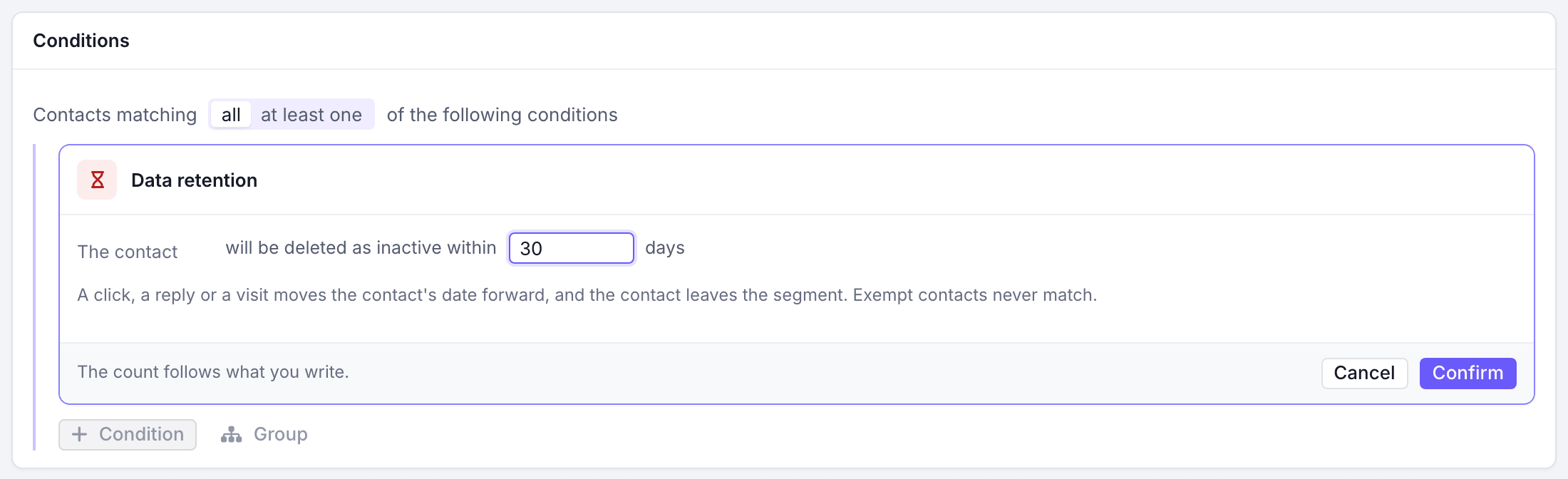
See Building segments. The condition is not available in automation triggers.
Runs
The run starts every day at 05:00 UTC. A server that starts more than 25 hours after the last run catches up 5 minutes after it starts.
One run deletes at most 5,000 inactive contacts and 500,000 rows per category. What is left goes at the next run, so a first run on a large workspace spreads over several days.
The Runs table on the page shows each run, its status, and what it removed per category. A category it skipped says why: off, still reading past activity, or an exempt list or segment that is missing. Export CSV downloads the history. Each run that removed something also writes a dataRetention.purged entry in the audit log, with counts and never an address.
Licence
Configuring a policy or the deployment defaults needs a licence key that covers data retention (Enterprise). Without one:
- switching a category off and removing an exemption are always allowed;
- a policy saved while a key covered it keeps running after the key expires;
- the page, the preview, the runs and their export stay available.
Everything else, such as switching a category on or changing a period, is refused with a 402. See Licence keys.
Backups
Deleted data stays in your database backups until they rotate out. If you restore a backup, the next run deletes again what has passed its period.
Several servers
Two servers never run the same workspace at the same time: the run holds a PostgreSQL session lock. Behind a pooler in transaction mode, such as PgBouncer with pool_mode = transaction, that lock does not hold. Connect Notifuse to PostgreSQL directly or through a pooler in session mode.
API
| Route | Use |
|---|---|
GET /api/dataRetention.get | The policy, what is in force, the change that waits and the last runs. |
POST /api/dataRetention.preview | What a policy would remove, without saving it. |
POST /api/dataRetention.set | Save a policy (owners). |
POST /api/dataRetention.cancelPending | Cancel the change that waits (owners). |
GET /api/dataRetention.runs | The run history. |
POST /api/dataRetention.exportRuns | The run history as CSV. |
POST /api/dataRetention.retryBackfill | Read past activity again after a failure (owners). |
GET /api/dataRetention.getDefaults, POST /api/dataRetention.setDefaults | The deployment defaults (root). |