
Gmail, Yahoo, Outlook and other mailbox providers check three DNS records before they trust an email from your domain. This page explains what they are, where to get them and how to check them.
SPF, DKIM and DMARC
- SPF (Sender Policy Framework) is a TXT record that lists the servers allowed to send email for a domain. The receiving server checks the server that delivered the email against that list.
- DKIM (DomainKeys Identified Mail) is a signature added to each email, checked against a public key published in your DNS. It shows that the email comes from your domain and was not changed on the way.
- DMARC is a TXT record at
_dmarc.yourdomain.comthat tells receivers what to do with email that fails SPF and DKIM for your domain. It also gives an address where receivers send reports.
Your email provider signs your email
Notifuse hands each email to the email provider you connected, which sends it from its own servers. The provider applies the DKIM signature, and its servers are the ones SPF has to allow. So the records come from the provider’s console, and you add them at the company that hosts your DNS.
Notifuse doesn’t check or display your SPF, DKIM or DMARC records. Use the provider’s console to see whether your domain is verified, and the commands in Check your records to see what is published.
DKIM also matters for unsubscribes: mail clients only offer one-click unsubscribe when the DKIM signature covers the List-Unsubscribe headers that Notifuse adds. See Gmail and Yahoo sender requirements.
Where each provider shows its records
Every provider below asks you to verify your sending domain or your senders before Notifuse can send with them. That verification is where it lists the DNS records to add.
| Provider | Where to find the DNS records | Notifuse page |
|---|---|---|
| Amazon SES | The provider’s domain verification page, in the AWS SES console. Senders must be verified there before you can use them. | Amazon SES |
| Mailgun | The provider’s domain verification page for your sending domain, the one you enter in the integration’s Domain field (such as mg.yourdomain.com). | Mailgun |
| Postmark | The provider’s domain verification page, in your Postmark account. Senders must be verified there. | Postmark |
| SendGrid | Sender Authentication, in your SendGrid account. Senders must be verified through it. | SendGrid |
| SparkPost | The provider’s domain verification page, in your SparkPost account. Senders must be verified there. | SparkPost |
| Mailjet | The provider’s domain verification page, in your Mailjet account. Senders must be verified there. | Mailjet |
| SMTP | Whoever runs the SMTP server signs the email. Ask your mail host or server administrator for the SPF and DKIM records. The integration’s EHLO Hostname is the only related setting in Notifuse, and it doesn’t sign anything. | SMTP |
SPF is checked on the domain in the email’s return path, which is often the provider’s own domain unless you set up a custom one with the provider. DMARC can still pass through DKIM, as long as the DKIM signature uses your domain.
A DMARC record to start with
Note
This is general email practice, not a Notifuse setting. Notifuse doesn’t read or use your DMARC record.
If your domain has no DMARC record yet, start with a policy that only collects reports:
| Type | Name | Value |
|---|---|---|
| TXT | _dmarc.yourdomain.com | v=DMARC1; p=none; rua=mailto:dmarc-reports@yourdomain.com |
With p=none, receivers deliver your email as before and send daily aggregate reports to the rua address. Read them for a few weeks to find every service that sends as your domain.
Once all your legitimate email passes, you can move to p=quarantine, then p=reject. A domain has one DMARC record and one SPF record: if you already have them, edit them instead of adding a second one.
Check your records
Run these from a terminal. Replace yourdomain.com with your domain, and selector with the DKIM selector your provider gives you. Some providers publish DKIM as a TXT record, others as a CNAME: query the type the provider shows.
dig +short TXT yourdomain.com
dig +short TXT _dmarc.yourdomain.com
dig +short TXT selector._domainkey.yourdomain.com
dig +short CNAME selector._domainkey.yourdomain.com
nslookup -type=TXT yourdomain.com
nslookup -type=TXT _dmarc.yourdomain.com
nslookup -type=TXT selector._domainkey.yourdomain.com
nslookup -type=CNAME selector._domainkey.yourdomain.comAn empty answer means the record isn’t published yet, or not under that name. DNS changes can take a while to show up.
To see the result on a real email, send a test to a Gmail address and open Show original in Gmail. It shows whether SPF, DKIM and DMARC passed.
The custom domain for links is a separate record
A workspace can serve its email links (tracked clicks, unsubscribe links), its notification center and its web pages on your own domain. This domain doesn’t authenticate your email. It needs its own DNS record, separate from SPF, DKIM and DMARC.
Set it in Settings → General, in the Custom domain panel. The console shows the record to add:
| Type | Name | Value |
|---|---|---|
| CNAME | Your domain, such as links.yourdomain.com | The API endpoint host shown in the console |
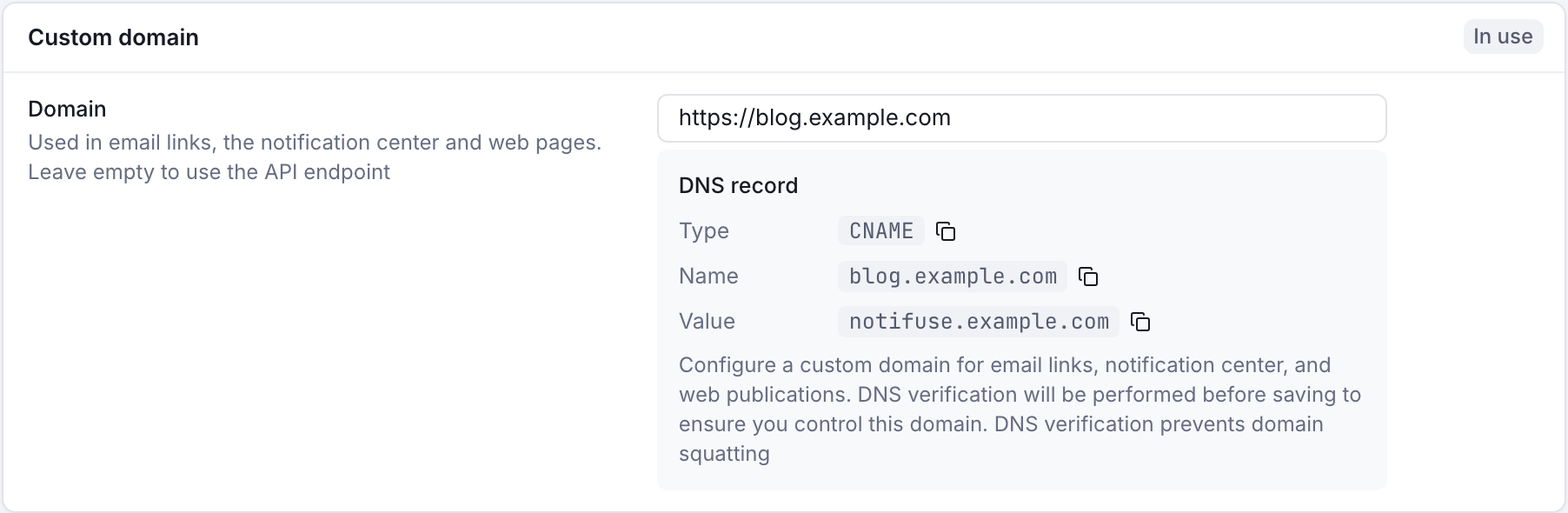
An A record that points to the same IP addresses as the API endpoint also works. Notifuse checks the record when you save a new or changed domain. On a production instance, it refuses to save the domain until the record points to Notifuse.
A domain belongs to one workspace. See Custom Endpoint URL for the rules, and Changing domain if you self-host.